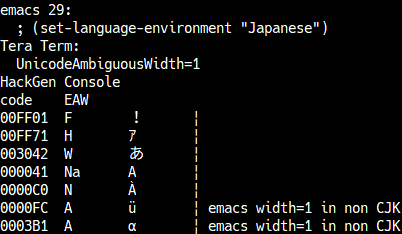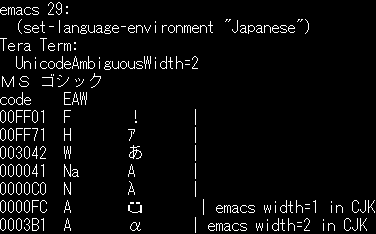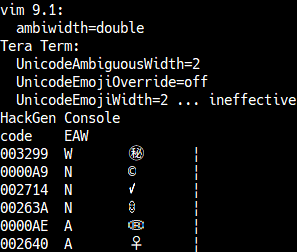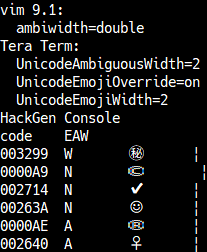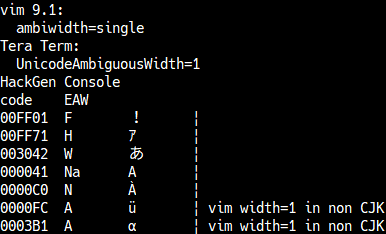
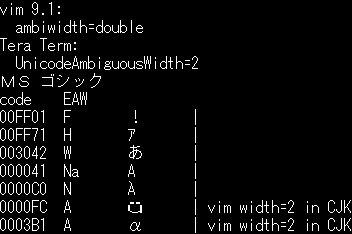
Some text files in the Tera Term repository can be displayed and checked.
Character width for single-byte character code such as Latin-1 is 1 cell.
Character width for double-byte character code such as Shift_JIS is 1 cell for 1-byte characters and 2 cells for 2-byte characters.
In Unicode, character width of a single character changes case-by-case.
Example, "§" (section sign, section mark)
| code               | character code(code point) | cell   |
|--------------------|----------------------------|--------|
| ISO8859-1(Latin-1) | 0xA7                       | 1      |
| Shift_JIS(CP932)   | 0x8198                     | 2      |
| KS5601(CP949)      | 0xA1D7                     | 2      |
| Big5(CP950)        | 0xA1B1                     | 2      |
| BG2312(CP936)      | 0xA1EC                     | 2      |
| Unicode            | 0xA7 (U+00A7)              | 1 or 2 |
In a multibyte character code environment (CJK), character width should be 2 cell, and in other environments it should be 1 cell for natural use. Type of character whose width changes are called Ambiguous. Refer to East_Asian_Width and width (cells) for detail.
In Unicode, characters are classified into 6 categories of display width, defined by the East_Asian_Width property.
In addition, there are two types of interpretation of character width
The following table
cells(2=full/1=half)
|              | East Asian | non-East Asian |
| property     | context    | context        |
| F(Fullwidth) | 2          | 2              |
| H(Halfwidth) | 1          | 1              |
| W(Wide)      | 2          | 2              |
| Na(Narrow)   | 1          | 1              |
| A(Ambiguous) | 2          | 1              |
| N(Neutral)   | 1          | 1              |
Tera Term determines the character width used for rendering based on the properties of the following data.
https://www.unicode.org/Public/UCD/latest/ucd/EastAsianWidth.txt
Setting Ambiguous Characters width allows you to specify the width of ambiguous characters.
When the remote host program is in a CJK environment,
it is generally assumed that ambiguous characters have a width of 2.
Example in Vim:
When ambiwidth=single, ambiguous characters have a width of 1.
When ambiwidth=double, ambiguous characters have a width of 2.
If you want to customize the width of certain characters,
such as setting some characters (e.g., umlauted letters) to width 1 like in Emacs,
you can use setcellwidths().
Example in Emacs:
By default, ambiguous characters in Emacs have a width of 1.
Calling (set-language-environment "Japanese") executes use-cjk-char-width-table.
This changes the width of some ambiguous characters to 2 (for example,
umlauted letters remain 1, while Greek and Cyrillic characters become 2).
If "the width used by Tera Term for rendering" is adjusted to match "the width expected by the remote host", display misalignment is less likely to occur.
The Emoji property is a separate property from East_Asian_Width. Even characters with the Emoji property set to Yes also have a value for the East_Asian_Width property.
Tera Term determines whether a character is an emoji based on the Extended_Pictographic property of the data below.
https://www.unicode.org/Public/UCD/latest/ucd/emoji/emoji-data.txt
The character width expected by the remote host may differ from the width defined by the font design.
For example, an emoji with the East_Asian_Width property set to Neutral may be designed as 2 cells in the font.
By specifying a width of 2 cells for emoji using the
Override Emoji Characters Width setting,
characters can be rendered according to the font design.
However, this may cause display misalignment, and even Neutral emoji will be rendered as 2 cells.