Encoding
- Receive
-
Kanji character that is received from host.
Please refer to available character encoding page.
- Transmit (Use different code)
-
Kanji character that is sent from client.
Please refer to available character encoding page.
Unicode
Select the character width (number of cells) used by Tera Term to render text when using Unicode (UTF-8).
Specifying the character width expected by the remote host helps reduce display issues.
Refer to Drawing resized font to fit cell width for Tera Term drawing character width.
Ambiguous Characters width
Select 1 Cell or 2 Cell for the character width of characters with the Ambiguous East_Asian_Width property.
Refer to East_Asian_Width and width (cells).
Override Emoji Characters width
Sets the character width for characters whose Emoji property is set to Yes.
For details about this property, refer to About Emoji width (cells).
When unchecked, the character width is determined based on the value of the East_Asian_Width property.
When the same width is applied regardless of the property value (W, N, or A).
- Emoji with U+1F000 and above are 2Cell (full-width).
- Emoji less than U+1F000:
- when selected 2 Cell
- 2 Cell (full-width)
- when selected 1 Cell
- 1 Cell (half-width)
Override Character width Per Character
This check box is enabled if Character width setting is exists in TERATERM.INI file.
When checked, User's character width setting is used.
Tera Term determines character widths according to Unicode specification.
If the remote host distinguishes character widths more finely than the
"characters with a certain property" described above,
this option allows you to flexibly configure character widths in Tera Term.
This can be used in following cases.
Host's Unicode version differs from Tera Term, user want to uses own character width.
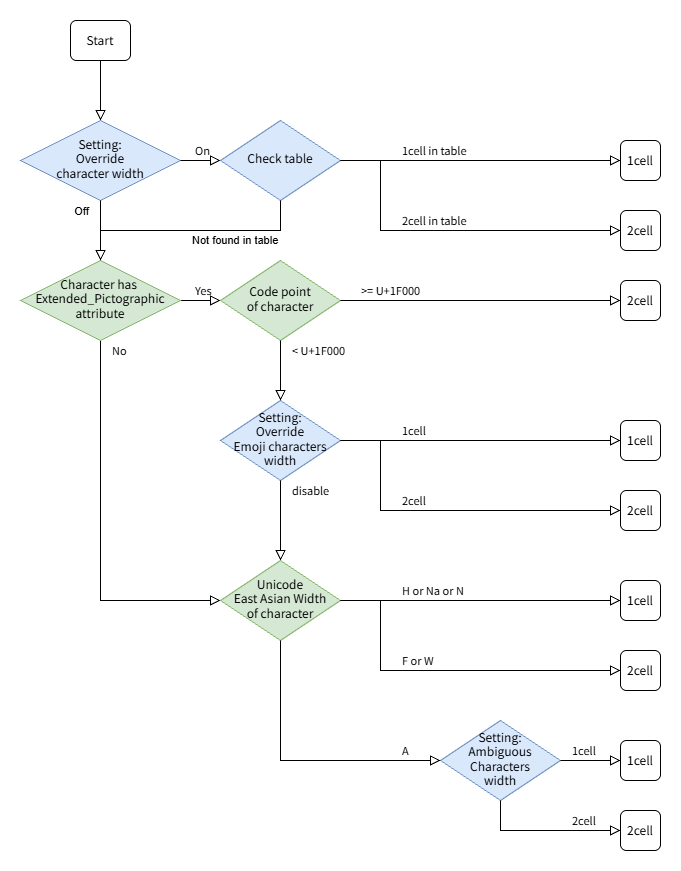
Flow of character width determination
As described above, Tera Term provides multiple settings for specifying
the character width used for rendering.
The following diagram illustrates the priority order of these settings.
DEC Special Graphics
Select display method for DEC Special Graphics
- Mapping Unicode to DEC Special Graphics
-
Unicode is converted to DEC Special Graphic, displays with "Tera Special" font.
Character width of DEC Special Graphic is 1 cell (half-width).
Select character type to be converted.
See Mapping of Unicode to DEC special character
- Box-drawing character (U+2500-U+257F)
- Punctuation, Block Elements, Shade
- Middle dots(U+00B7,U+2024,U+2219)
- Mapping DEC Special Graphics to Unicode
-
DEC Special Graphic is converted to Unicode, displays with VT Window font.
The character width displayed in Unicode differs for each character.
It changes depending on Ambiguous Characters width setting.
- Do not mapping
-
DEC Special Graphic displays with "Tera Special" font.
No Unicode replacement is performed.
JIS
Receive
- Half-width kana
-
When "HANKAKU" katakana code from host is described for 7bit
(Shift control with SO/SI is using), please select this entry.
This is only enabled when Kanji (receive) is JIS.
Transmit
- Half-width kana transmit
-
When "HANKAKU" katakana code from host is described for 7bit
(Shift control with SO/SI is using), please select this entry.
This is only enabled when Kanji (transmit) is JIS.
- Kanji-in
-
The escape sequence is used when Kanji (transmit) is JIS.
(Sequence regarding Kanji character is specified to G0.
^[$@ or ^[$B).
The escape sequence from host can use any sequence.
- Kanji-out
-
The escape sequence is used when Kanji (transmit) is JIS.
(Sequence regarding ASCII and JIS Roman code is specified to G0.
^[(B or ^[(J ).
The escape sequence from host can use any sequence.
NOTICE: ^[(H can not be selected on initial setting.